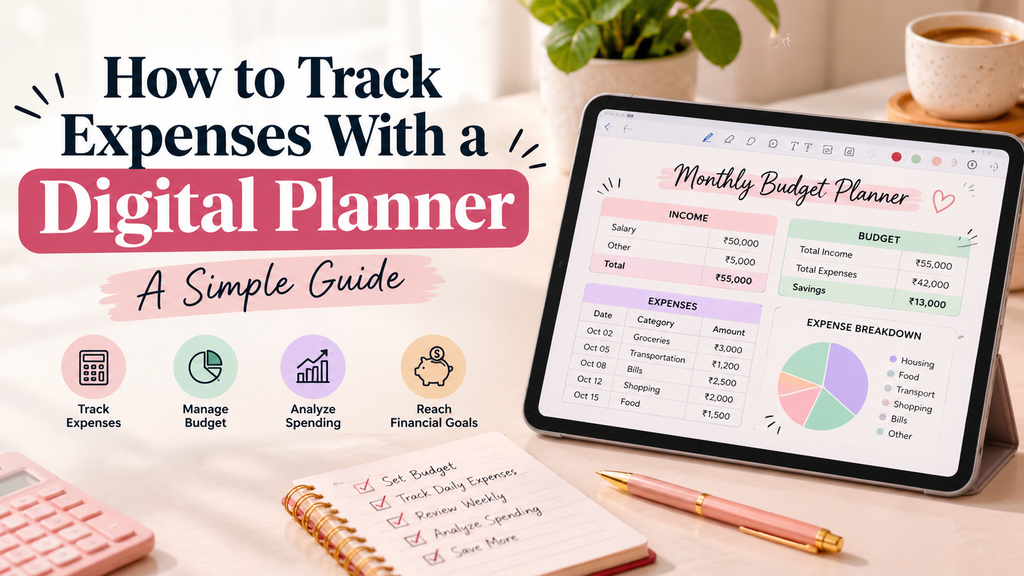
Most business owners and founders can tell you last month’s revenue, but far fewer can explain where every dollar went. Learning how to track expenses with a digital planner helps you monitor daily spending, manage your budget, and identify unnecessary costs before they affect your profits. Small, untracked expenses can add up quietly, reducing your margins over time.
Tracking expenses gives you better control over cash flow, helps you spot waste, and supports smarter financial decisions. A digital planner makes this process easier by keeping your budget, daily spending, and financial reviews organized in one place, accessible from a compatible device.
In this guide, you will learn what a digital expense tracker is, why it is useful, and how to set one up in seven steps. You will also discover a sample expense tracker, common mistakes to avoid, and answers to frequently asked questions.
Do You Want Purchase Digital Products ?
What Is a Digital Expense Tracker?
A digital expense tracker is a tool where you record spending, sort it into categories, and compare it against your budget. A digital planner often does this alongside your goals, schedules, and notes.
Digital planner vs. traditional expense tracking. Traditional tracking relies on notebooks, receipts, or loose spreadsheets. It works, but it is manual and easy to neglect. A digital planner is editable, searchable, and available wherever you work.
How it works. You create budget sections, add each expense with its date, amount, and category, and review totals daily, weekly, and monthly.
Benefits. Digital tracking saves time, reduces errors, and makes patterns visible quickly.
Why Use a Digital Planner to Track Expenses?
Keep All Your Expenses in One Place
Scattered receipts and separate files make it hard to see the full picture. A digital planner keeps everything together, so you always know where to look.
Track Spending From Anywhere
Whether you are at a client meeting or traveling, you can log a purchase in seconds on a compatible device. Nothing gets forgotten.
Track Expenses Immediately
Budget and spending sit side by side, so you can see immediately how much you have left in each category.
Identify Unnecessary Spending by digital planner
Unused subscriptions, duplicate tools, and impulse purchases become obvious once they appear in a clear list.
Review Your Planner Every Week
Regular reviews turn raw numbers into insight. You start to see which habits support your goals and which work against them.
How to Track Expenses With a Digital Planner
1. Choose the Right Digital Planner
Look for these features:
- Daily, weekly, and monthly expense sections
- Space for budgeting and category totals
- Easy editing and searching
- Compatibility with your devices
A simple layout beats a complicated one. If it is hard to use, you will stop using it.
2. Set Your Monthly Budget plans
- Determine your monthly income. Use a conservative figure, especially if your income varies.
- Set spending limits. Decide how much you can spend before savings and growth investments suffer.
- Divide your budget into categories. Assign a limit to each one.
3. Create Expense Categories
Common categories include:
- Housing
- Food
- Transportation
- Shopping
- Entertainment
- Bills
- Savings
- Other expenses
Business owners may add categories such as marketing, software, or professional services.
4. Record Every Expense by digital planner
- Add expenses as soon as you make them
- Record the date, amount, and category
- Avoid forgetting small purchases, since they add up fastest
5. Common Mistakes to Avoid When Tracking Expenses
- Daily tracking: Log new expenses at the end of each day, or immediately.
- Weekly review: Spend ten minutes checking totals and categories.
- Monthly review: Look at the full month and plan the next one.
6. Compare Your Spending With Your Budget planner
Check planned versus actual spending. Identify categories where you overspend, then adjust your budget if your original numbers were unrealistic.
7. Track Your Monthly Expenses
Find spending patterns, identify unnecessary expenses, and set goals for the following month, such as cutting one category by 10% or raising your savings contribution.
Case study (illustrative example). A freelance consultant noticed her income was healthy but her savings were flat. After three months of logging expenses in a digital planner, she found she was paying for four overlapping software subscriptions and spending heavily on takeaway lunches during client days. She cancelled two tools and planned meals ahead. Her monthly savings rose by roughly 18%, without any change in income. The lesson is that visibility often creates savings on its own.
Example of a Digital Expense Tracker
Here is a simple example of how entries look:
| Date | Expense | Category | Amount |
|---|---|---|---|
| Oct 2 | Groceries | Food | $45 |
| Oct 4 | Bus | Transportation | $10 |
| Oct 6 | Coffee | Food | $6 |
| Oct 8 | Subscription | Bills | $15 |
To use this format, create a similar table in your digital planner. Enter each purchase on the day it happens, choose one category, and add up totals at the end of the week. In this example, Food totals $51, Transportation $10, and Bills $15, so $76 in all. Compare each total with its budget limit to see where you stand.
Tips for Better Expense Tracking With a Digital Planner
Track Expenses Immediately
Waiting until later means forgetting. Log it while it is fresh.
Don’t Ignore Small Purchases
A $6 coffee seems harmless, but daily purchases become a significant monthly cost.
Set Realistic Spending Limits by digital planner
Budgets that are too strict get abandoned. Base your limits on actual past spending, then tighten gradually.
Who Can Benefit From a Digital Expense Tracker?
A weekly check catches problems while you can still fix them.
Use Categories Consistently digital plaaner
If “lunch” is sometimes Food and sometimes Entertainment, your reports will be unreliable. Pick a rule and stick to it.
Set a Monthly Savings Goal
Treat savings as a category with its own target, not what is left over.
Common Mistakes to Avoid When Tracking Expenses
- Tracking expenses only at the end of the month. You will forget items and lose accuracy.
- Forgetting cash purchases. Keep a habit of noting them straight away.
- Creating too many categories. Eight to ten is usually enough. More creates confusion.
- Setting unrealistic budgets. Aim for achievable, not perfect.
- Not reviewing spending patterns. Data without review is just a list.
Case study (illustrative example). A small agency founder tracked expenses with 25 categories. After two weeks, he gave up because logging took too long. He reduced the list to nine categories, and tracking became a two-minute daily task. Simplicity kept the habit alive.
Digital Planner vs. Traditional Expense Tracking
| Digital Planner | Traditional Method |
|---|---|
| Easy to update | Manual writing |
| Accessible on compatible devices | Requires physical notebook |
| Easy to organize | Can become messy |
| Can combine budgeting and planning | Usually separate |
| Easy to review | Harder to analyze |
Paper still suits some people. But if you want speed, flexibility, and easier analysis, digital wins.
Who Can Benefit From a Digital Expense Tracker?
- Students managing limited funds
- Families coordinating household budgets
- Freelancers handling irregular income
- Small-business owners separating personal and business costs
- People trying to save money who need clarity
- Anyone who wants better spending habits
Frequently Asked Questions
Can I use a digital planner to track my daily expenses?
Yes. Daily sections let you log each purchase quickly and see totals at a glance.
What should I include in a digital expense tracker?
Include the date, expense name, category, and amount. Add a notes column if you want extra detail, plus budget limits for each category.
How often should I track my expenses?
Daily logging is ideal. Pair it with a weekly review and a longer monthly review.
Is a digital expense tracker better than a notebook?
For most people, yes, because it is easier to update, organize, and analyze. The best method is still the one you will actually use.
What should I include in a digital expense tracker?
Yes. You can set income, allocate category limits, and compare planned versus actual spending in one place.
Final Thoughts
Knowing where your money goes is the foundation of smart growth. A digital planner gives you a clear, consistent system for tracking, reviewing, and improving your spending habits, whether you run a business or are building one.
Start small. Choose a planner, set a realistic budget, and log every expense for one month. The patterns you uncover will guide better decisions, and a clearer view of your finances makes it easier to invest confidently in what grows your business online.